


Gruntwork Developer Portal
Your organization can register repositories in the Gruntwork Developer Portal for your central team catalog.
Once you sign in with terragrunt login, terragrunt catalog automatically discovers those repositories, with no catalog HCL configuration required.
Management of the repositories discovered this way happens through use of the Gruntwork Developer Portal, on the account page at app.gruntwork.io.
Install the Gruntwork.io GitHub App
Section titled “Install the Gruntwork.io GitHub App”The portal can only list repositories the Gruntwork.io GitHub App can access. Open the GitHub App section of the account page. If it doesn’t show your GitHub account as linked, install the app from there.
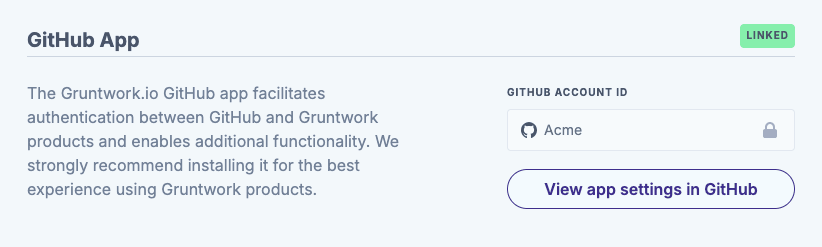
To grant the app access to more repositories, select View app settings in GitHub and add them there.
Select your catalog repositories
Section titled “Select your catalog repositories”Open the Catalog section of the account page and choose your catalog repositories from the Catalog Repositories list.
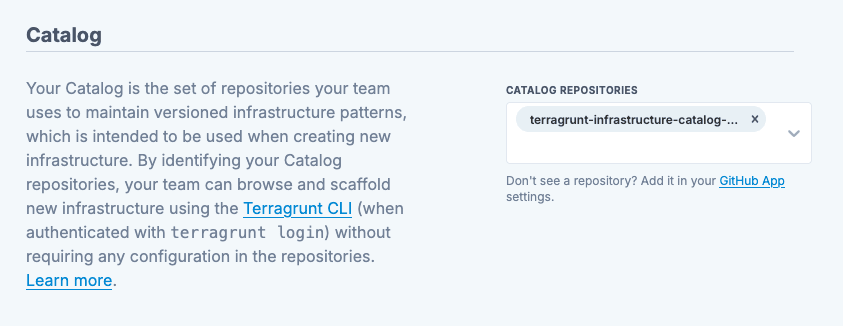
If you can’t find your repository in the picker, make sure that you have correctly configured the Gruntwork.io GitHub App, granting access to the repositories you want served to your team while using the catalog command.
Browse the catalog
Section titled “Browse the catalog”To use the catalog entries configured in the Gruntwork Developer Portal locally, first ensure that Terragrunt is authenticated locally using the login command:
terragrunt --experiment tg-login loginOnce you’re logged in, the catalog command will automatically detect that you are, and fetch catalog entries from the Gruntwork Developer Portal on start-up.
terragrunt --experiment tg-login catalogThe repositories selected in the portal join any that you have already configured in the catalog block of your Terragrunt HCL configurations.
Terragrunt clones each repository with your own git credentials for discovery of components within them, so you still need read access to every repository in the catalog. This may change in the future.