
Stack Operations
Passing outputs between units
Section titled “Passing outputs between units”Consider the following file structure:
Directoryroot
Directorybackend-app
- terragrunt.hcl
Directorymysql
- terragrunt.hcl
Directoryvalkey
- terragrunt.hcl
Directoryvpc
- terragrunt.hcl
Suppose that you wanted to pass in the VPC ID of the VPC that is created from the vpc unit in the directory structure above to the mysql unit as an input variable. Or that you wanted to pass in the subnet IDs of the private subnet that is allocated as part of the vpc unit.
You can use the dependency block to extract those outputs and use them as inputs to the mysql unit.
For example, suppose the vpc unit outputs the ID under the output named vpc_id. To access that output, you would specify in mysql/terragrunt.hcl:
dependency "vpc" {  config_path = "../vpc"}
inputs = {  vpc_id = dependency.vpc.outputs.vpc_id}
When you apply this unit, the output will be read from the vpc unit and passed in as an input to the mysql unit right before calling tofu apply/terraform apply.
You can also specify multiple dependency blocks to access the outputs of multiple units.
For example, in the above folder structure, you might want to reference the domain output of the valkey and mysql units for use as inputs in the backend-app unit. To access those outputs, you would specify the following in backend-app/terragrunt.hcl:
dependency "mysql" {  config_path = "../mysql"}
dependency "valkey" {  config_path = "../valkey"}
inputs = {  mysql_url = dependency.mysql.outputs.domain  valkey_url = dependency.valkey.outputs.domain}
Note that each dependency block results in a relevant status in the Terragrunt DAG. This means that when you run run --all apply on a config that has dependency blocks, Terragrunt will not attempt to deploy the config until all the units referenced in dependency blocks have been applied. So for the above example, the order for the run --all apply command would be:
-
Deploy the VPC
-
Deploy MySQL and valkey in parallel
-
Deploy the backend-app
If any of the units failed to deploy, then Terragrunt will not attempt to deploy the units that depend on them.
Note: Not all blocks can access outputs passed by dependency blocks. See the section on Configuration parsing order for more information.
Unapplied dependency and mock outputs
Section titled “Unapplied dependency and mock outputs”Terragrunt will return an error if the unit referenced in a dependency block has not been applied yet. This is because you cannot actually fetch outputs out of an unapplied unit, even if there are no resources being created in the unit.
This is most problematic when running commands that do not modify state (e.g run --all plan and run --all validate) on a completely new setup where no infrastructure has been deployed. You won’t be able to plan or validate a unit if you can’t determine the inputs. If the unit depends on the outputs of another unit that hasn’t been applied yet, you won’t be able to compute the inputs unless the dependencies are all applied.
Of course, in real life usage, you typically need the ability to run run --all validate or run --all plan on a completely new set of infrastructure.
To address this, you can provide mock outputs to use when a unit hasn’t been applied yet. This is configured using the mock_outputs attribute on the dependency block and it corresponds to a map that will be injected in place of the actual dependency outputs if the target config hasn’t been applied yet.
Using a mock output is typically the best solution here, as you typically don’t actually care that an accurate value is used for a given value at this stage, just that it will plan successfully. When you actually apply the unit, that’s when you want to be sure that a real value is used.
For example, in the previous scenario with a mysql unit and vpc unit, suppose you wanted to mock a value for the vpc_id during a run --all validate for the mysql unit.
You can specify that in mysql/terragrunt.hcl:
dependency "vpc" {  config_path = "../vpc"
  mock_outputs = {    vpc_id = "mock-vpc-id"  }}
inputs = {  vpc_id = dependency.vpc.outputs.vpc_id}
You can now run validate on this config before the vpc unit is applied because Terragrunt will use the map {vpc_id = "mock-vpc-id"} as the outputs attribute on the dependency instead of erroring out.
What if you wanted to restrict this behavior to only the validate command? For example, you might not want to use the defaults for a plan operation because the plan doesn’t give you any indication of what is actually going to be created.
You can use the mock_outputs_allowed_terraform_commands attribute to indicate that the mock_outputs should only be used when running those OpenTofu/Terraform commands. So to restrict the mock_outputs to only when validate is being run, you can modify the above terragrunt.hcl file to:
dependency "vpc" {  config_path = "../vpc"
  mock_outputs = {    vpc_id = "temporary-dummy-id"  }
  mock_outputs_allowed_terraform_commands = ["validate"]}
inputs = {  vpc_id = dependency.vpc.outputs.vpc_id}
Note that indicating validate means that the mock_outputs will be used either with validate or with run --all validate.
You can also use skip_outputs on the dependency block to specify the dependency without pulling in the outputs:
dependency "vpc" {  config_path = "../vpc"
  skip_outputs = true}
When skip_outputs is used with mock_outputs, mocked outputs will be returned without attempting to load outputs from OpenTofu/Terraform.
This can be useful when you disable backend initialization (remote_state.disable_init) in CI for example.
dependency "vpc" {  config_path = "../vpc"
  mock_outputs = {    vpc_id = "temporary-dummy-id"  }
  skip_outputs = true}
You can also use mock_outputs_merge_strategy_with_state on the dependency block to merge mocked outputs and real outputs:
dependency "vpc" {  config_path = "../vpc"
  mock_outputs = {    vpc_id     = "temporary-dummy-id"    new_output = "temporary-dummy-value"  }
  mock_outputs_merge_strategy_with_state = "shallow"}
If real outputs only contain vpc_id, dependency.outputs will contain a real value for vpc_id and a mocked value for new_output.
Passing outputs between units in explicit stacks
Section titled “Passing outputs between units in explicit stacks”When defining units using a terragrunt.stack.hcl file, you might need to perform some indirection to pass outputs between units, as the dependency relationship of each unit is explicitly defined in each unit’s terragrunt.hcl file.
For example, say you wanted to generate the stack above using the following terragrunt.stack.hcl file:
unit "vpc" {  source = "github.com/acme/infrastructure-catalog//units/vpc?ref=v1.0.0"  path   = "vpc"}
unit "mysql" {  source = "github.com/acme/infrastructure-catalog//units/mysql?ref=v1.0.0"  path   = "mysql"}
unit "valkey" {  source = "github.com/acme/infrastructure-catalog//units/valkey?ref=v1.0.0"  path   = "valkey"}
unit "backend_app" {  source = "github.com/acme/infrastructure-catalog//units/backend-app?ref=v1.0.0"  path   = "backend-app"}
Generating this stack would generate the following:
Directory.terragrunt-stack
Directoryvpc
- terragrunt.hcl
Directorymysql
- terragrunt.hcl
Directoryvalkey
- terragrunt.hcl
Directorybackend-app
- terragrunt.hcl
The backend-app unit would need to access the outputs of the mysql and valkey units to use as inputs. To do this, you can use the dependency block to access the outputs of the mysql and backend-app units.
dependency "vpc" {  config_path = values.vpc_path}
inputs = { vpc_id = dependency.vpc.outputs.vpc_id}dependency "mysql" { config_path = values.mysql_path}
dependency "valkey" { config_path = values.valkey_path}
inputs = { mysql_url = dependency.mysql.outputs.domain valkey_url = dependency.valkey.outputs.domain}And update the terragrunt.stack.hcl file to:
unit "vpc" {  source = "github.com/acme/infrastructure-catalog//units/vpc?ref=v1.0.0"  path   = "vpc"}
unit "mysql" {  source = "github.com/acme/infrastructure-catalog//units/mysql?ref=v1.0.0"  path   = "mysql"  values = {    vpc_path = "../vpc"  }}
unit "valkey" {  source = "github.com/acme/infrastructure-catalog//units/valkey?ref=v1.0.0"  path   = "valkey"  values = {    vpc_path = "../vpc"  }}
unit "backend_app" {  source = "github.com/acme/infrastructure-catalog//units/backend-app?ref=v1.0.0"  path   = "backend-app"  values = {    mysql_path  = "../mysql"    valkey_path = "../valkey"  }}
Following this pattern, the path to dependencies are passed in as values to the unit, and units themselves define dependency blocks that utilize those values.
Dependencies between units
Section titled “Dependencies between units”You can also specify dependencies without accessing any of the outputs of units. Consider the following file structure:
Directoryroot
Directorybackend-app
- terragrunt.hcl
Directoryfrontend-app
- terragrunt.hcl
Directorymysql
- terragrunt.hcl
Directoryvalkey
- terragrunt.hcl
Directoryvpc
- terragrunt.hcl
Let’s assume you have the following dependencies between OpenTofu/Terraform units:
-
backend-appdepends onmysql,valkey, andvpc -
frontend-appdepends onbackend-appandvpc -
mysqldepends onvpc -
valkeydepends onvpc -
vpchas no dependencies
You can express these dependencies in your terragrunt.hcl config files using a dependencies block. For example, in backend-app/terragrunt.hcl you would specify:
dependencies { paths = ["../vpc", "../mysql", "../valkey"]}Similarly, in frontend-app/terragrunt.hcl, you would specify:
dependencies { paths = ["../vpc", "../backend-app"]}Once you’ve specified these dependencies in each terragrunt.hcl file, Terragrunt will be able to perform updates respecting the DAG of dependencies.
For the example at the start of this section, the order of runs for the run --all apply command would be:
-
Deploy the VPC
-
Deploy MySQL and valkey in parallel
-
Deploy the backend-app
-
Deploy the frontend-app
Any error encountered in an individual unit during a run --all command will prevent Terragrunt from proceeding with the deployment of any dependent units.
To check all of your dependencies and validate the code in them, you can use the run --all validate command.
Visualizing the DAG
Section titled “Visualizing the DAG”To visualize the dependency graph you can use the dag graph command (similar to the tofu/terraform graph command), or its equivalent list --format=dot --dependencies --external command.
The graph is output in DOT format. The typical program used to render this file format is GraphViz, but many web services are available that can do this as well.
terragrunt dag graph | dot -Tsvg > graph.svg# Or equivalently:terragrunt list --format=dot --dependencies --external | dot -Tsvg > graph.svgThe example above generates the following graph:
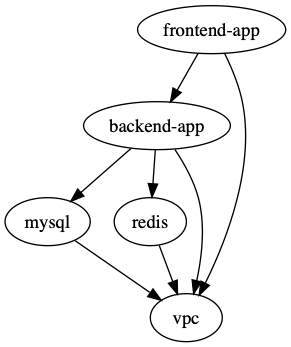
Note that this graph shows the dependency relationship in the direction of the arrow, with the tip pointing to the dependency (e.g. frontend-app depends on backend-app).
For plans and applies, Terragrunt will run units in the opposite direction, however (e.g. backend-app would be applied before frontend-app).
The exception to this rule is during the destroy (and plan/apply -destroy) commands, where Terragrunt will run in the direction of the arrow (e.g. frontend-app would be destroyed before backend-app).
Testing multiple units locally
Section titled “Testing multiple units locally”If you are using Terragrunt to download remote OpenTofu/Terraform modules and all of your units have the source parameter set to a Git URL, but you want to test with a local checkout of the code, you can use the --source parameter to override that value:
terragrunt run --all --source /source/modules -- planIf you set the --source parameter, the run --all command will assume that parameter is pointing to a folder on your local file system that has a local checkout of all of your OpenTofu/Terraform modules.
For each unit that is being processed via a run --all command, Terragrunt will:
- Read in the
sourceparameter in that unit’sterragrunt.hclfile. - Parse out the path (the portion after the double-slash).
- Append the path to the
--sourceparameter to create the final local path for that unit.
For example, consider the following terragrunt.hcl file:
terraform { source = "git::git@github.com:acme/infrastructure-modules.git//networking/vpc?ref=v0.0.1"}Running the following:
terragrunt run --all --source /source/infrastructure-modules -- applyWill result in a unit with the configuration for the source above being resolved to /source/infrastructure-modules//networking/vpc.
Limiting run parallelism
Section titled “Limiting run parallelism”By default, Terragrunt will not impose a limit on the number of units it executes when it traverses the dependency graph, meaning that if it finds 5 units without dependencies, it’ll run OpenTofu/Terraform 5 times in parallel, once in each unit.
Sometimes, this can create a problem if there are a lot of units in the dependency graph, like hitting a rate limit on a cloud provider.
To limit the maximum number of unit executions at any given time use the --parallelism [number] flag
terragrunt run --all --parallelism 4 -- applySaving OpenTofu/Terraform plan output
Section titled “Saving OpenTofu/Terraform plan output”A powerful feature of OpenTofu/Terraform is the ability to save the result of a plan as a binary file using the -out flag.
Terragrunt provides special tooling in run --all execution to ensure that the saved plan for a run --all against a stack has
a corresponding entry for each unit in the stack in a directory structure that mirrors the stack structure.
To save every plan generated when running a stack, use the --out-dir flag (or TG_OUT_DIR environment variable) as demonstrated below:
$ terragrunt run --all --out-dir /tmp/tfplan -- planDirectoryapp1
- tfplan.tfplan
Directoryapp2
- tfplan.tfplan
Directoryapp3
- tfplan.tfplan
Directoryproject-2
Directoryproject-2-app1
- tfplan.tfplan
This integration also exists for the apply command, where the generated plan will be used when performing the apply.
$ terragrunt run --all --out-dir /tmp/tfplan -- applyFor planning a destroy operation, use the following commands:
terragrunt run --all --out-dir /tmp/tfplan -- plan -destroyterragrunt run --all --out-dir /tmp/tfplan -- applyTo save plans in json format use the --json-out-dir flag:
terragrunt run --all --json-out-dir /tmp/json -- planDirectoryapp1
- tfplan.json
Directoryapp2
- tfplan.json
Directoryapp3
- tfplan.json
Directoryproject-2
Directoryproject-2-app1
- tfplan.json
terragrunt run --all --out-dir /tmp/all --json-out-dir /tmp/all -- planDirectoryapp1
- tfplan.json
- tfplan.tfplan
Directoryapp2
- tfplan.json
- tfplan.tfplan
Directoryapp3
- tfplan.json
- tfplan.tfplan
Directoryproject-2
Directoryproject-2-app1
- tfplan.json
- tfplan.tfplan
Nested Stacks
Section titled “Nested Stacks”Note that you can also have nested stacks.
For example, consider the following file structure:
Directoryroot
Directoryus-east-1
Directoryapp
- terragrunt.hcl
Directorydb
- terragrunt.hcl
Directoryus-west-2
Directoryapp
- terragrunt.hcl
Directorydb
- terragrunt.hcl
In this example, there’s the root stack, that contains all the infrastructure you’ve defined so far,
and there’s also the us-east-1 and us-west-2 stacks, that contain the infrastructure for the app and db units in those regions.
You can run run --all commands at any depth of the stack to run the units in that stack and all of its children.
For example, to run all the units in the us-east-1 stack, you can run:
cd root/us-east-1terragrunt run --all applyTerragrunt will only include the units in the us-east-1 stack and its children in the queue of units to run.
This is the primary tool Terragrunt users use to control the blast radius of their changes. For the most part, it is the current working directory that determines the blast radius of a run --all command.
In addition to using your working directory to control what’s included in a run queue, you can also use Filters to control this.
There are more flags that control the behavior of the run command, which you can find in the run docs.